laravel-repository
Repository Design Pattern ⏛ DRY (Dont Repeat Yourself) design, the code to query and fetch data from data source(s) is not repeated.
Laravel Repository Design Pattern

Contents
Upgrade Notice
NOTE: The reason why I modified how the
Repositoryis being created because I want theRepositoryto useRoute Model Bindingfor faster data query.
What is the Repository Design Pattern
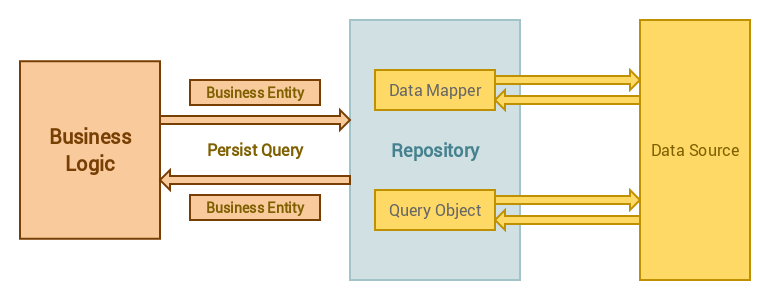
To put it simply, it is an implementation of a brokering layer between the application and a data source. Neither party needs to be be aware of the other to perform their respective jobs which allows us to have a decoupled architecture which in turn helps in the scaling of the application in the big leagues without having hard dependencies.
Is it the magic bullet
Well, no it is not. Like every design pattern it has its ups and downs, pros and cons.
Pros:
- Separation of concerns; the application need not know about or track any or all data sources.
- Allows easy unit testing as the repositories are bound to interfaces which are injected into classes at run time.
- DRY (Dont Repeat Yourself) design, the code to query and fetch data from data source(s) is not repeated.
Cons:
- Adds another layer of abstraction which adds a certain level of complexity making it an overkill for small applications.
Source
Usage
This package provide a command-line interface for you to create repository in your Laravel application.
Installation
Require pp-spaces/laravel-repository package to your laravel installation
composer require pp-spaces/laravel-repository
Make a repository
Run the following command to generate repository:
php artisan make:repository UserRepository
To make model repository simply run:
php artisan make:repository UserRepository --model=User
Use Case
   +-------------+                                +-------------+       +-------------+
   |             |                                |             |       |             |
   |             |---------------------------------             ---------             |
   |             |      +-------------------+     |             |       |             |
   | Controllers |      |      Persist      |     | Repository  |       |   Models    |
   |             |      |   Database Query  |     |             |       |             |
   |             |      +-------------------+     |             |       |             |
   |             ---------------------------------|             ---------             |
   |             |                                |             |       |             |
   +-------------+                                +-------------+       +-------------+
How to use Repository
Create your repository, e.g. UserRepository for User model:
php artisan make:repository UserRepository --model=User
Update UserRepository logic:
namespace App\Http\Repositories;

use PPSpaces\Repositories\Repository;

class UserRepository extends Repository {

    /**
     * The user model instance.
     *
     * @var \App\User
     */
    protected $model = "App\User";

    /**
     * Scope a query for the model before executing
     *
     * @param \Illuminate\Database\Query\Builder $query
     * @return void
     */
    public function before($query) {
        $query->role('staff');
    }

    /**
     * Get all of the models from the database.
     *
     * @param  array|mixed  $columns
     * @return \Illuminate\Database\Eloquent\Collection|static[]
     */
    public function get($columns = ['*']) {
        $users = $this->repository
                    ->active()
                    ->orderBy('updated_at', 'DESC')
                    ->get();

        return $users;
    }
}
NOTE: Check
PPSpaces\Repositories\Modelfor available methods that you may override. Keep in mind that you still have access to all Model instance that you’ve created. The$this->useris the instance of your\App\Usermodel.
Within your UserController assume you have a resource controller created. Inject the UserRepository to the contoller. Now you can access the repository in your controller method:
use App\Http\Repositories\UserRepository;

class UserController extends Controller
{
    protected $users;

    public function __construct(UserRepository $users)
    {
        $this->users = $users;
    }

    public function index()
    {
        return $this->users->get();
    }
}
Or alternatively, you may use Route Model Binding on the controller actions whose type-hinted variable names match a route segment name.
Read more about Route Model Binding here
public function index(UserRepository $user)
{
    return $user->get();
}

public function show(UserRepository $user)
{
    // Authorizing the repository model
    // Check https://laravel.com/docs/master/authorization
    $this->authorize('view', $user->model());

    // This $user will resolved by the id provided by the router
    // e.g. /api/user/1
    // $user will be the result of $user->id === 1
    return $user;
}
How to upgrade?
Upgrade from
v0.0.9or earilier tov1.0.0
What you need to do
namespace App\Http\Repositories;

- use App\User;

- use PPSpaces\Repositories\Model as Repository;
+ use PPSpaces\Repositories\Repository;

class UserRepository extends Repository {

+    /**
+     * The user model instance.
+     *
+     * @var \App\User
+     */
+    protected $model = "App\User";

-     protected $user;

-    public function __construct(User $user) {
-        $this->user = $user;
-    }

    public function index()
    {
         // `$this->users->all()` will always resolved the same result as `$this->users->get()`
-        return $this->users->all();
+        return $this->users->get();
    }

}
Help
Description:
  Create a new repository class

Usage:
  make:repository [options] [--] <name>

Arguments:
  name                  The name of the class

Options:
  -m, --model[=MODEL]   Generate a repository for the given model.
  -h, --help            Display this help message
  -q, --quiet           Do not output any message
  -V, --version         Display this application version
      --ansi            Force ANSI output
      --no-ansi         Disable ANSI output
  -n, --no-interaction  Do not ask any interactive question
      --env[=ENV]       The environment the command should run under
  -v|vv|vvv, --verbose  Increase the verbosity of messages: 1 for normal output, 2 for more verbose output and 3 for debug